
From your phone
- Open the Faxer app on your iPhone or Android device
- Pick a file from your phone or a digital scan
- Handy when you’re away from your desk or don’t have a printer
How to fax
Need to send a fax but don’t know where to start? You don’t need a traditional fax machine. Upload your document to Faxer, enter the recipient’s fax number and send it online from your computer or smartphone.
You can send a fax without a fax machine through an online fax service. Instead of printing documents or connecting a phone line, you upload a digital file and send it to the recipient’s fax number.
Open Faxer on your device and select the files you want to send. PDF, Word, JPG and PNG files are supported, and you can send several related documents together.
Type the fax number the recipient gave you, with the area code for US destinations, or choose the country for international faxes. Double-check it, and add a cover page if you want one.
Review your documents and recipient, then send. Track the fax status in Faxer and keep the delivery confirmation for your records.
The steps are the same on any device. Here’s what changes.
Two things: a document that’s ready to go and the correct fax number.
(212) 555-0123
You don’t need a fax machine, printer or dedicated phone line, and you don’t need the recipient’s email address. The fax number is the destination.
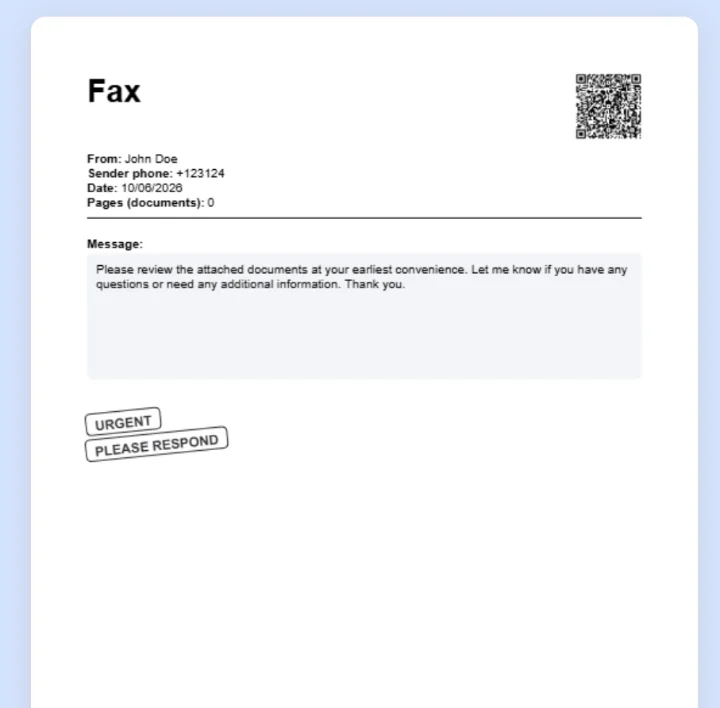
A cover page appears before your document and tells the recipient who sent it and why. Add your name, phone number and a short message, and mark it Urgent, Confidential or Please Respond.
It’s optional, so skip it if the recipient doesn’t ask for one. Want the details? See our fax cover sheet page.
A successful transmission means the receiving fax system accepted your document. It doesn’t mean someone has opened or processed it.
With Faxer, you can track your fax and review its delivery confirmation. For time-sensitive documents, keep the confirmation and contact the recipient if you need an acknowledgment.
If your fax fails, check:
Two practical questions before you send.
Traditional faxing can involve equipment, phone-line costs or print-shop fees. Online fax services generally use subscriptions, introductory offers or usage-based pricing.
Faxer is an online fax subscription that includes document sending and delivery confirmation. Review the current offer, renewal terms and cancellation conditions on the pricing page before you start.
Protection depends on the service and how you handle the document. Check the fax number carefully, use a trusted connection and don’t share documents with unauthorized parties.
Healthcare, legal and financial documents may have specific compliance requirements. A “Confidential” label signals how to handle a fax but adds no technical security. Learn more about secure online faxing.
Yes. You can send a fax through an online fax service using a computer, smartphone, or tablet. With Faxer, you upload your document, enter the recipient’s fax number, and follow the online sending process.
Yes. PDF files are commonly used for online faxing. Faxer supports PDF uploads along with other document and image formats. You don’t need to print a PDF before sending it online.
Yes. An online fax service can transmit a digital document to a compatible traditional fax machine. The recipient generally doesn’t need to use the same online service. You only need their fax number.
No. A fax cover page is optional unless the recipient specifically requests one. If you add one, briefly explain what you’re sending and why. See our fax cover sheet page for details.
You can fax documents received by email by downloading the attachment and uploading it to an online fax service such as Faxer. Sending directly from an email address requires a specific email-to-fax feature, which is different from uploading an email attachment.
Yes, provided your fax service supports the destination. You’ll need the correct international fax number, including the relevant country code. Check available destinations and any applicable charges before sending. See our international fax guide.
Transmission time depends on the number of pages, connection conditions, and the availability of the recipient’s fax system. Sending a larger document can take longer, and a busy destination may delay delivery. Check the fax status rather than assuming the transmission is complete.
Some online fax services provide limited free sending or promotional offers. The conditions vary by provider and may change over time. Check the current offer and subscription terms on Faxer’s pricing page before you start.
Upload a document from your device, enter the recipient’s fax number and check the delivery status, all without a fax machine.
No fax machine · No printer · No dedicated phone line
How to fax
Need to send a fax but don’t know where to start? You don’t need a traditional fax machine. Upload your document to Faxer, enter the recipient’s fax number and send it online from your computer or smartphone.
You can send a fax without a fax machine through an online fax service. Instead of printing documents or connecting a phone line, you upload a digital file and send it to the recipient’s fax number.
Open Faxer on your device and select the files you want to send. PDF, Word, JPG and PNG files are supported, and you can send several related documents together.
Type the fax number the recipient gave you, with the area code for US destinations, or choose the country for international faxes. Double-check it, and add a cover page if you want one.
Review your documents and recipient, then send. Track the fax status in Faxer and keep the delivery confirmation for your records.
The steps are the same on any device. Here’s what changes.
Two things: a document that’s ready to go and the correct fax number.
(212) 555-0123
You don’t need a fax machine, printer or dedicated phone line, and you don’t need the recipient’s email address. The fax number is the destination.
A cover page appears before your document and tells the recipient who sent it and why. Add your name, phone number and a short message, and mark it Urgent, Confidential or Please Respond.
It’s optional, so skip it if the recipient doesn’t ask for one. Want the details? See our fax cover sheet page.
A successful transmission means the receiving fax system accepted your document. It doesn’t mean someone has opened or processed it.
With Faxer, you can track your fax and review its delivery confirmation. For time-sensitive documents, keep the confirmation and contact the recipient if you need an acknowledgment.
If your fax fails, check:
Two practical questions before you send.
Traditional faxing can involve equipment, phone-line costs or print-shop fees. Online fax services generally use subscriptions, introductory offers or usage-based pricing.
Faxer is an online fax subscription that includes document sending and delivery confirmation. Review the current offer, renewal terms and cancellation conditions on the pricing page before you start.
Protection depends on the service and how you handle the document. Check the fax number carefully, use a trusted connection and don’t share documents with unauthorized parties.
Healthcare, legal and financial documents may have specific compliance requirements. A “Confidential” label signals how to handle a fax but adds no technical security. Learn more about secure online faxing.
Yes. You can send a fax through an online fax service using a computer, smartphone, or tablet. With Faxer, you upload your document, enter the recipient’s fax number, and follow the online sending process.
Yes. PDF files are commonly used for online faxing. Faxer supports PDF uploads along with other document and image formats. You don’t need to print a PDF before sending it online.
Yes. An online fax service can transmit a digital document to a compatible traditional fax machine. The recipient generally doesn’t need to use the same online service. You only need their fax number.
No. A fax cover page is optional unless the recipient specifically requests one. If you add one, briefly explain what you’re sending and why. See our fax cover sheet page for details.
You can fax documents received by email by downloading the attachment and uploading it to an online fax service such as Faxer. Sending directly from an email address requires a specific email-to-fax feature, which is different from uploading an email attachment.
Yes, provided your fax service supports the destination. You’ll need the correct international fax number, including the relevant country code. Check available destinations and any applicable charges before sending. See our international fax guide.
Transmission time depends on the number of pages, connection conditions, and the availability of the recipient’s fax system. Sending a larger document can take longer, and a busy destination may delay delivery. Check the fax status rather than assuming the transmission is complete.
Some online fax services provide limited free sending or promotional offers. The conditions vary by provider and may change over time. Check the current offer and subscription terms on Faxer’s pricing page before you start.
Upload a document from your device, enter the recipient’s fax number and check the delivery status, all without a fax machine.
No fax machine · No printer · No dedicated phone line